Search Console
Shows what people searched, which pages appeared, impressions, clicks, and click-through rate.
Small business marketing guide
A plain-English, low-cost system for Central Florida contractors, doctors, law offices, inventors, and local service businesses.
Google Search is changing. More people now see an AI-generated answer at the top of a results page before they see traditional website links. For a local business, that can feel frustrating: your information may help answer the question, but the customer may not always click through.
This does not mean websites are dead or that every business needs another expensive marketing subscription. It means you need a calmer way to watch the questions that matter, see whether Google is showing your company, and measure whether search traffic still produces calls, appointments, quote requests, and sales.
For most small businesses, this is enough to start. You can add paid software later only if the data proves it is worth it.
Shows what people searched, which pages appeared, impressions, clicks, and click-through rate.
Shows what visitors do after they arrive: calls, forms, appointments, purchases, and engagement.
Optional free setup that can label certain detectable search-result visits inside GA4.
Your low-cost record of priority searches, AIO appearances, citations, competitors, and leads.
Track the questions your best prospects ask before they hire you—not hundreds of vanity keywords.
Start with 10 to 20 searches. A roofing contractor might watch “roof leak repair in Clermont,” “how long does a roof last in Florida,” and “roof replacement cost in Orlando.” A medical practice might watch “same-day doctor near me,” “urgent care versus ER,” and the services it legally and appropriately promotes. An inventor or patent professional might watch questions about prototypes, patent searches, licensing, or the specific problem they solve.
Use phrases that show intent. “How much does [service] cost,” “best [service] near me,” “can [service] fix [problem],” and “[service] in [city]” are often more valuable than broad phrases with large search volume. A smaller number of relevant searches can produce better leads than a giant list of vague keywords.
| Question to track | AIO appears? | Your business cited? | Best page to improve |
|---|---|---|---|
| How much does [service] cost in [city]? | Yes / No | Yes / No | Pricing or service page |
| Best [service] near me | Yes / No | Yes / No | Location or reviews page |
| How do I solve [problem]? | Yes / No | Yes / No | Helpful guide or FAQ |
| [Service] vs. [alternative] | Yes / No | Yes / No | Comparison article |
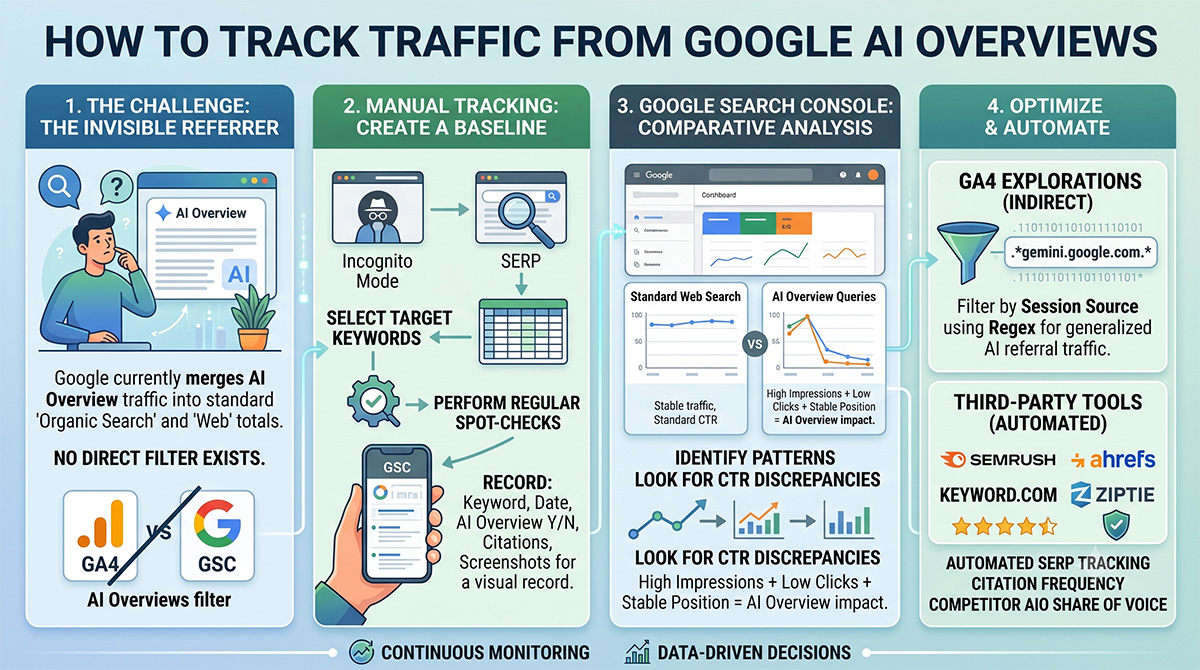
Check the list weekly or monthly in a private/incognito browser window. Search results change by location, device, and time, so do not panic over one result. You are looking for trends: which questions repeatedly trigger an AI Overview, which sources Google trusts, and where your content can become more useful.
Google Search Console is the best free starting point because it tells you how often people saw your site in Google results and how often they clicked. It will not always hand you a perfect “AI Overview clicks” report, but it does show the important business pattern.
Open Performance → Search results. Compare the last 28 days with the previous 28 days, then look at the Queries and Pages tabs. Watch for important searches where impressions stay steady or rise while clicks and click-through rate fall. That can mean searchers are getting a quick answer inside Google before they click a website.
Do not assume every click decline is caused by AI. Rankings, seasonality, competitors, map results, ads, news, and website changes all matter. Use your spreadsheet and manual searches to add context before making decisions.
A lower click count is not automatically a business problem. The real question is whether qualified leads are falling or improving.
Track tap-to-call clicks and calls from your primary business number.
Mark a successful form, appointment, estimate request, or consultation as a key event in GA4.
When possible, connect completed jobs or sale value back to the lead source in your CRM.
These are related, but they are not the same thing.
This is a visitor who clicks a link in ChatGPT, Perplexity, Claude, Gemini, Copilot, or another AI tool. GA4 can often identify these as referral sources. Create an “AI Referrals” channel group to see visits and leads from these tools in one place.
This is a visitor who clicks your website from Google’s AI-generated answer. Google commonly includes that activity within regular Google organic search data, so it is harder to separate precisely.
For an optional technical signal, a web developer can use Google Tag Manager to record certain text-highlighted visits as a custom GA4 event. Treat it as “detected text-fragment SERP visits,” not a complete or guaranteed AI Overview total.
Google’s AI features are designed to find helpful information. The same content basics that help customers and traditional search results still matter: clear answers, original experience, accurate service details, strong local information, and pages that work well on a phone.
Give a clear answer near the top, then explain the details. Do not make a visitor hunt through filler paragraphs.
Use service areas, project examples, credentials, office details, and real answers based on your work in Central Florida.
Review prices, hours, services, licensing, bios, and policies. Outdated pages are not helpful to people or search engines.
A helpful article should still give a visitor an easy way to call, request an estimate, schedule, or ask a question.